> ## Documentation Index
> Fetch the complete documentation index at: https://docs.cow.bleu.builders/llms.txt
> Use this file to discover all available pages before exploring further.
# CoW AMM Deployer
> The is a user-friendly Safe App that simplifies the process of deploying and managing (Automated Market Makers) from Safe wallets. It enables users without programming skills to take advantage of the benefits of CoW AMM.
The app was developed by [bleu](https://github.com/bleu-fi) with sponsorship from the [CoW Grants DAO](https://grants.cow.fi/).
This app is only accessible from a Safe wallet.
The Safe wallet you use to create a CoW AMM should **ONLY** be used for the purpose of deploying a CoW AMM.
Provide the tokens for the CoW AMM to your Safe wallet **before** creating the CoW AMM. Beware **any** imbalance between tokens will *automatically* be traded.
## Prerequisites
Before using the CoW AMM Deployer, ensure that you have the following:
1. A Safe wallet: If you don't have one, follow these steps to create a new Safe wallet:
* Go to the [Safe website](https://app.safe.global/welcome) and click on "Create new Safe".
* Choose the network (e.g., Ethereum) and the number of required confirmations.
* Add the owners of the Safe wallet and set the threshold for confirmations.
* Review and create the Safe wallet.
2. Necessary tokens: Transfer both tokens that you want to provide liquidity for to your Safe wallet. Make sure you have sufficient amounts of each token.
Once that's done, you're ready to create your first CoW AMM!
## Creating an AMM
To create a new CoW AMM using the deployer, follow these steps:
1. Access the CoW AMM Deployer app from your Safe wallet.
2. On the homepage, click on the "Create AMM" button.
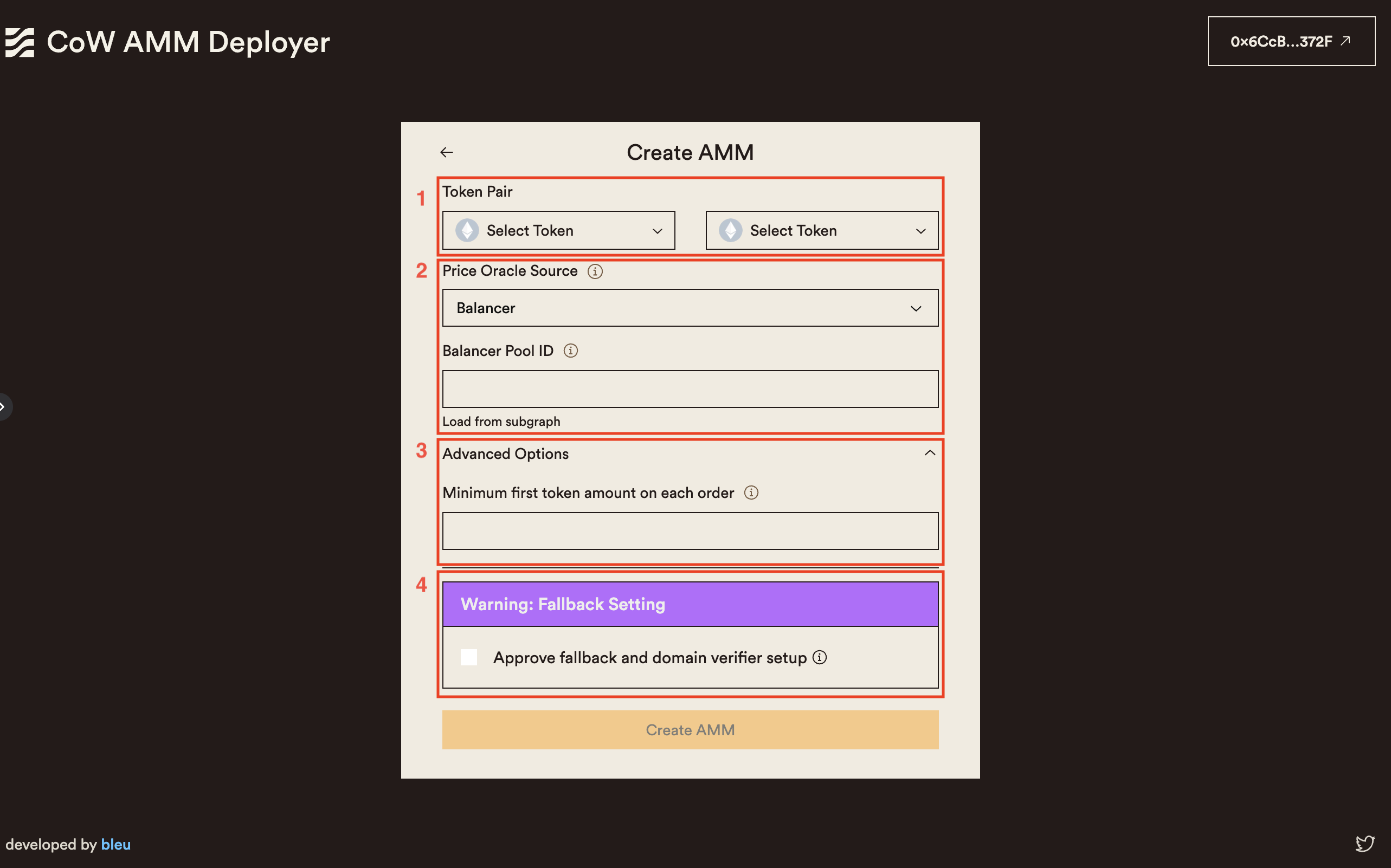
3. Fill in the required information in the AMM creation form:
* **Token Pair**: Select the token pair you want to provide liquidity for. Both tokens should already be in your Safe wallet.
* **Price Oracle**: Choose the price oracle (e.g., Balancer, Uniswap V2) to provide price hints to the watch-tower about your CoW AMM. Enter the pool identifier used by the selected protocol. You can also load this information from the protocol subgraph using the provided button. If the button fails, it means there isn't a pool with at least \$1000 USD of TVL for that token pair.
* **Minimum Trade Amount**: Specify the minimum amount of the first token required for each trade. For most tokens, this value is automatically filled. If not, a strategy may be to calculate the equivalent of \$10 USD in the first token.
* **Fallback Handler**: If your wallet is unsupported, upgrade to a Safe with the special fallback handler. [Learn all about the new Safe Extensible Fallback Handler](https://blog.cow.fi/all-you-need-to-know-about-cow-swaps-new-safe-fallback-handler-8ef0439925d1) and its relevance to Safe in this [overview](https://help.safe.global/en/articles/40838-what-is-a-fallback-handler-and-how-does-it-relate-to-safe). Naturally, the upgrade process has undergone [extensive auditing](https://github.com/cowprotocol/composable-cow/tree/ab3addad9bc05acdbf5fb040eb5c336209b58e31/audits) for increased peace of mind.
4. Review the entered information and click on the "Create AMM" button.
5. Sign the transaction on your Safe wallet to confirm the AMM creation.
6. Wait for the transaction to be confirmed. You will be redirected to the "Manager" page once the AMM is successfully created.
 ## Managing and Editing an AMM
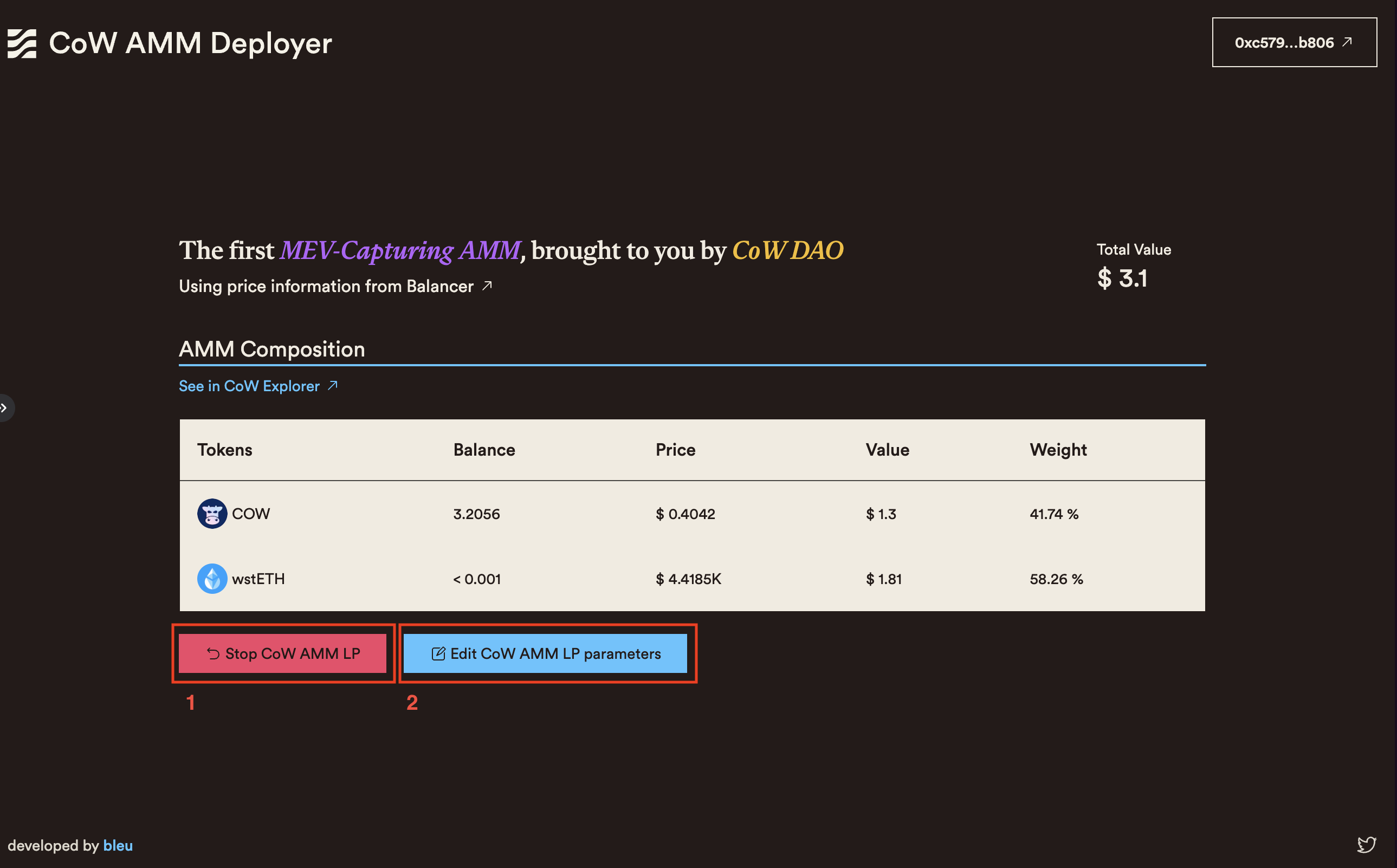
The "Manager" page provides an overview of your CoW AMM LP position and allows you to manage and edit its parameters.
The page displays the following information:
* **Total Value**: The total value of the liquidity provided to the AMM, calculated based on the current token prices.
* **Token Amounts**: The individual amounts of each token in the AMM liquidity pool.
* **Price Oracle**: The selected price oracle used by the AMM.
* **Swaps Link**: A link to view the swaps executed by the CoW AMM on the CoW Explorer.
From the "Manager" page, you can perform two actions:
1. **Stop AMM LP Position**: Clicking this button will redirect you to a confirmation page. After confirming, the CoW AMM will be stopped, and the tokens in your Safe wallet will no longer be used to provide liquidity.
2. **Edit AMM LP Parameters**: This action will redirect you to the AMM creation form, pre-filled with the current parameters of the AMM. You can modify the parameters as needed and push the changes your existing AMM.
## Managing and Editing an AMM
The "Manager" page provides an overview of your CoW AMM LP position and allows you to manage and edit its parameters.
The page displays the following information:
* **Total Value**: The total value of the liquidity provided to the AMM, calculated based on the current token prices.
* **Token Amounts**: The individual amounts of each token in the AMM liquidity pool.
* **Price Oracle**: The selected price oracle used by the AMM.
* **Swaps Link**: A link to view the swaps executed by the CoW AMM on the CoW Explorer.
From the "Manager" page, you can perform two actions:
1. **Stop AMM LP Position**: Clicking this button will redirect you to a confirmation page. After confirming, the CoW AMM will be stopped, and the tokens in your Safe wallet will no longer be used to provide liquidity.
2. **Edit AMM LP Parameters**: This action will redirect you to the AMM creation form, pre-filled with the current parameters of the AMM. You can modify the parameters as needed and push the changes your existing AMM.
 ## Additional Resources
* [CoW AMM Documentation](https://cow.fi/cow-amm)
* [CoW Grants DAO](https://grants.cow.fi/)
* [Safe Wallet Documentation](https://help.safe.global/)
* [CoW Swap (Safe App)](https://app.safe.global/share/safe-app?appUrl=https%3A%2F%2Fswap.cow.fi\&chain=eth)
## Troubleshooting and FAQs
### Frequently Asked Questions
1. **Can I create multiple CoW AMMs with the same Safe wallet?**
* No.
2. **What happens to my tokens when I stop an AMM LP position?**
* When you stop an AMM LP position, your tokens in your Safe will no longer be used to provide liqudity. As the CoW AMM **IS** the Safe when there is an active CoW AMM, the liquidity never leaves your Safe wallet! You can then withdraw or use them for other purposes.
3. **Can I change the token pair of an existing AMM?**
* No, once an AMM is created with a specific token pair, you cannot change the token pair. If you want to provide liquidity for a different token pair, you need to create a new AMM.
For further assistance or questions, join the [CoW Protocol Discord](https://discord.com/invite/cowprotocol) and ask in the `#tech-talk` channel.
## Programmatic Deployment (Without UI)
**You may also deploy a CoW AMM through the Balancer UI using [this guide.](https://cow.fi/learn/how-to-create-a-lvr-protected-liquidity-pool-on-cowamm)**
The proposed transactions and interactions can be executed through any smart contract or EOA transaction builder, Etherscan "Write Contract," from other UI mechanisms, or directly from the console.
### Factory Contract Addresses
* Ethereum Mainnet: [`0xf76c421bAb7df8548604E60deCCcE50477C10462`](https://etherscan.io/address/0xf76c421bAb7df8548604E60deCCcE50477C10462#code)
* Gnosis Chain: [`0x703Bd8115E6F21a37BB5Df97f78614ca72Ad7624`](https://gnosisscan.io/address/0x703Bd8115E6F21a37BB5Df97f78614ca72Ad7624#code)
* Arbitrum One: [`0xE0e2Ba143EE5268DA87D529949a2521115987302`](https://arbiscan.io/address/0xe0e2ba143ee5268da87d529949a2521115987302#code)
* Base: [`0x03362f847B4fAbC12e1Ce98b6b59F94401E4588e`](https://basescan.org/address/0x03362f847b4fabc12e1ce98b6b59f94401e4588e#code)
* Sepolia Testnet: [`0x1E3D76AC2BB67a2D7e8395d3A624b30AA9056DF9`](https://sepolia.etherscan.io/address/0x1E3D76AC2BB67a2D7e8395d3A624b30AA9056DF9#code)
These contracts can be verified through [this](https://github.com/balancer/cow-amm) repository.
### Steps
1. Call the `newBPool` function of the factory contract. An example transaction can be found [here](https://etherscan.io/tx/0x7543a97853827e267ecd3c1309509ac7704e4f85a53fbfacd6060f461d85bad8#eventlog). The `LOG_NEW_POOL` log reveals the address of the newly created pool.
In case ABI of the factory contract is not fetched, the ABI from the Sepolia network can be used.
2. Approve the tokens by calling `approve()` on the relevant ERC-20 token contract, with the "spender" set to the newly created BPool address.
Take the token's decimals into account when setting the correct approval amount.
3. Bind the approved tokens to the pool using the `bind()` function of the pool contract. One bind per token. The `denorm` parameter should always be set to `1000000000000000000` (10^18).
4. Set the swap fee by calling `setSwapFee()` on the pool contract. The fee is specified in wei (10^17 = 10%).
To guarantee full LVR protection, set the fee to 100% (technically up to 99.99%).
5. Finalize the pool by calling `finalize()` on the pool contract.
## Additional Resources
* [CoW AMM Documentation](https://cow.fi/cow-amm)
* [CoW Grants DAO](https://grants.cow.fi/)
* [Safe Wallet Documentation](https://help.safe.global/)
* [CoW Swap (Safe App)](https://app.safe.global/share/safe-app?appUrl=https%3A%2F%2Fswap.cow.fi\&chain=eth)
## Troubleshooting and FAQs
### Frequently Asked Questions
1. **Can I create multiple CoW AMMs with the same Safe wallet?**
* No.
2. **What happens to my tokens when I stop an AMM LP position?**
* When you stop an AMM LP position, your tokens in your Safe will no longer be used to provide liqudity. As the CoW AMM **IS** the Safe when there is an active CoW AMM, the liquidity never leaves your Safe wallet! You can then withdraw or use them for other purposes.
3. **Can I change the token pair of an existing AMM?**
* No, once an AMM is created with a specific token pair, you cannot change the token pair. If you want to provide liquidity for a different token pair, you need to create a new AMM.
For further assistance or questions, join the [CoW Protocol Discord](https://discord.com/invite/cowprotocol) and ask in the `#tech-talk` channel.
## Programmatic Deployment (Without UI)
**You may also deploy a CoW AMM through the Balancer UI using [this guide.](https://cow.fi/learn/how-to-create-a-lvr-protected-liquidity-pool-on-cowamm)**
The proposed transactions and interactions can be executed through any smart contract or EOA transaction builder, Etherscan "Write Contract," from other UI mechanisms, or directly from the console.
### Factory Contract Addresses
* Ethereum Mainnet: [`0xf76c421bAb7df8548604E60deCCcE50477C10462`](https://etherscan.io/address/0xf76c421bAb7df8548604E60deCCcE50477C10462#code)
* Gnosis Chain: [`0x703Bd8115E6F21a37BB5Df97f78614ca72Ad7624`](https://gnosisscan.io/address/0x703Bd8115E6F21a37BB5Df97f78614ca72Ad7624#code)
* Arbitrum One: [`0xE0e2Ba143EE5268DA87D529949a2521115987302`](https://arbiscan.io/address/0xe0e2ba143ee5268da87d529949a2521115987302#code)
* Base: [`0x03362f847B4fAbC12e1Ce98b6b59F94401E4588e`](https://basescan.org/address/0x03362f847b4fabc12e1ce98b6b59f94401e4588e#code)
* Sepolia Testnet: [`0x1E3D76AC2BB67a2D7e8395d3A624b30AA9056DF9`](https://sepolia.etherscan.io/address/0x1E3D76AC2BB67a2D7e8395d3A624b30AA9056DF9#code)
These contracts can be verified through [this](https://github.com/balancer/cow-amm) repository.
### Steps
1. Call the `newBPool` function of the factory contract. An example transaction can be found [here](https://etherscan.io/tx/0x7543a97853827e267ecd3c1309509ac7704e4f85a53fbfacd6060f461d85bad8#eventlog). The `LOG_NEW_POOL` log reveals the address of the newly created pool.
In case ABI of the factory contract is not fetched, the ABI from the Sepolia network can be used.
2. Approve the tokens by calling `approve()` on the relevant ERC-20 token contract, with the "spender" set to the newly created BPool address.
Take the token's decimals into account when setting the correct approval amount.
3. Bind the approved tokens to the pool using the `bind()` function of the pool contract. One bind per token. The `denorm` parameter should always be set to `1000000000000000000` (10^18).
4. Set the swap fee by calling `setSwapFee()` on the pool contract. The fee is specified in wei (10^17 = 10%).
To guarantee full LVR protection, set the fee to 100% (technically up to 99.99%).
5. Finalize the pool by calling `finalize()` on the pool contract.