> ## Documentation Index
> Fetch the complete documentation index at: https://docs.cow.bleu.builders/llms.txt
> Use this file to discover all available pages before exploring further.
# CoW Swap Widget
> Integrate the power of into your product! With the widget, you can create an incredible trading interface. Specify the required pair of currencies, customize the look and much more!
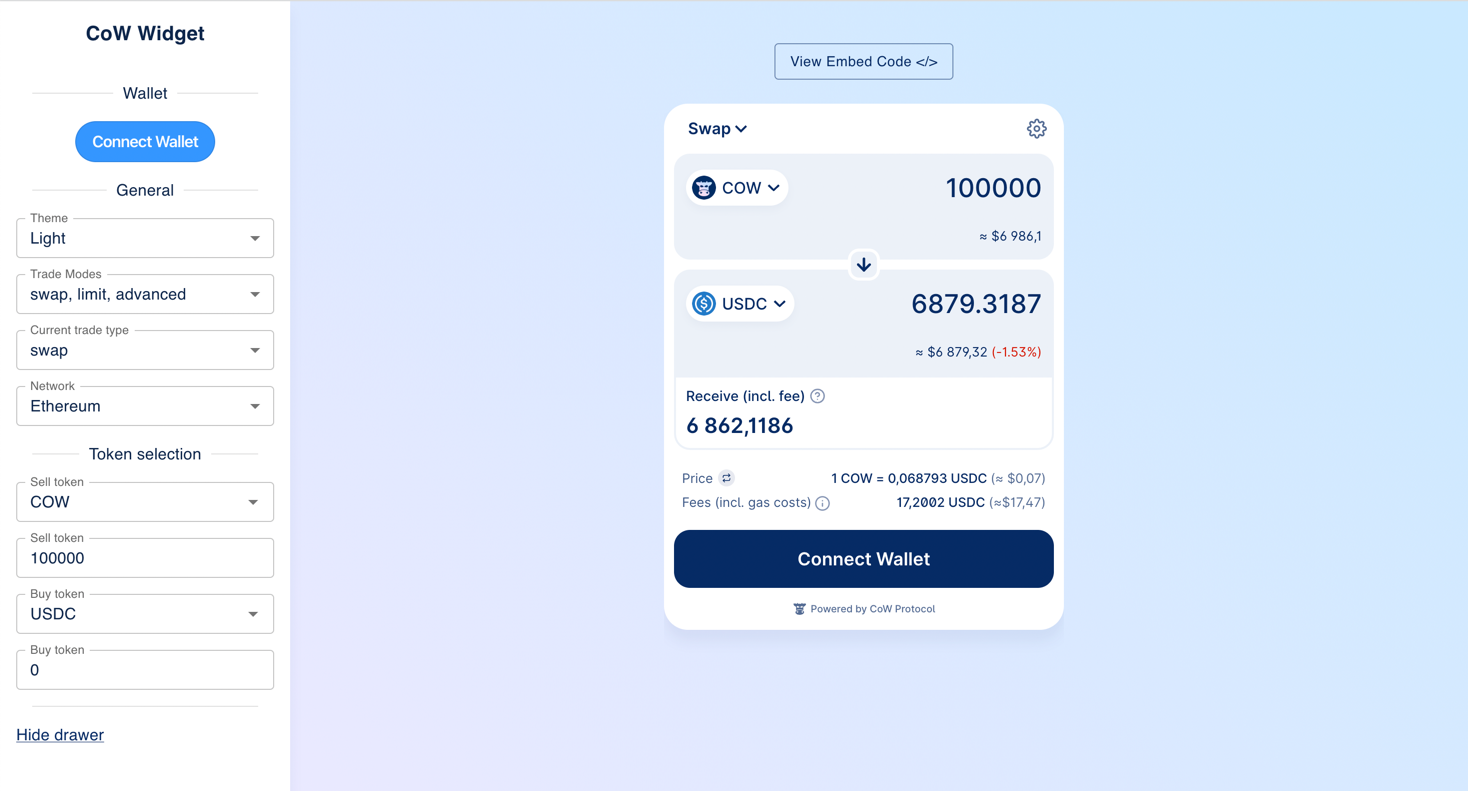
Create your own widget using the configurator [https://widget.cow.fi](https://widget.cow.fi).
 ## Install
```
yarn add @cowprotocol/widget-lib
```
```
npm install @cowprotocol/widget-lib
```
## Quick start
```
import { createCowSwapWidget, CowSwapWidgetParams } from '@cowprotocol/widget-lib'// HTML element where the widget will be renderedconst widgetContainer = document.getElementById('cowswap-widget')const params: CowSwapWidgetParams = { appCode: 'NAME-OF-YOU-APP', // Add here the name of your app. e.g. "Pig Swap" width: 600, height: 640, sell: { asset: 'DAI' }, buy: { asset: 'USDC', amount: '0.1' },}createCowSwapWidget(widgetContainer, { params })
```
## App key
You must specify the `appCode` parameter when initializing the widget. This parameter is used to identify the source of orders. The key must be a UTF8 string of up to 50 chars. It will be a part of orders meta-data, see more in the [CoW Protocol Docs](https://docs.cow.fi/front-end/creating-app-ids/create-the-order-meta-data-file/appcode).
## Partner fee
You may participate in the Partner Fee program to collect fee on [Market order](https://docs.cow.fi/cow-protocol/explanation/order-types/market-orders) trades executed by your users through the Widget by adding the following parameter to your Widget:
```
import { createCowSwapWidget, CowSwapWidgetParams } from '@cowprotocol/widget-lib'const widgetContainer = document.getElementById('cowswap-widget')const params: CowSwapWidgetParams = { partnerFee: { bps: 50, // 0.5% recipient: '0x0000000000000000000000000000000000000000', // Fee destination address },}createCowSwapWidget(widgetContainer, { params })
```
This configuration will apply a partner fee for all networks and trade types (swaps, limit orders, TWAPs, etc.). You can use [Flexible config](#flexible-config) for having more flexibility, or [Advanced configuration](#advanced-configuration) to have even more control over the partner fee configuration parameters.
### Flexible config
Both `bps` and `recipient` can be set for different chains and different trade types (swap/limit/advanced).
Bellow you can see the `partnerFee` configuration variations:
```
import { PartnerFee, SupportedChainId, TradeType } from '@cowprotocol/widget-lib'// The fee is 1% for all trades on all chainsconst a: PartnerFee = { bps: 100, recipient: '0x0000000000000000000000000000000000000000' }// Different fee per network and per trade type, same recipient for allconst b: PartnerFee = { bps: { [SupportedChainId.MAINNET]: { [TradeType.SWAP]: 100, [TradeType.LIMIT]: 50, [TradeType.ADVANCED]: 30 }, [SupportedChainId.ARBITRUM_ONE]: { [TradeType.SWAP]: 100, [TradeType.LIMIT]: 50, [TradeType.ADVANCED]: 30 }, [SupportedChainId.BASE]: { [TradeType.SWAP]: 100, [TradeType.LIMIT]: 50, [TradeType.ADVANCED]: 30 }, [SupportedChainId.GNOSIS_CHAIN]: { [TradeType.SWAP]: 100, [TradeType.LIMIT]: 50, [TradeType.ADVANCED]: 30 }, [SupportedChainId.AVALANCHE]: { [TradeType.SWAP]: 100, [TradeType.LIMIT]: 50, [TradeType.ADVANCED]: 30 }, [SupportedChainId.POLYGON]: { [TradeType.SWAP]: 100, [TradeType.LIMIT]: 50, [TradeType.ADVANCED]: 30 }, [SupportedChainId.BNB]: { [TradeType.SWAP]: 100, [TradeType.LIMIT]: 50, [TradeType.ADVANCED]: 30 }, [SupportedChainId.LINEA]: { [TradeType.SWAP]: 100, [TradeType.LIMIT]: 50, [TradeType.ADVANCED]: 30 }, [SupportedChainId.PLASMA]: { [TradeType.SWAP]: 100, [TradeType.LIMIT]: 50, [TradeType.ADVANCED]: 30 }, [SupportedChainId.SEPOLIA]: { [TradeType.SWAP]: 100, [TradeType.LIMIT]: 50, [TradeType.ADVANCED]: 30 }, }, recipient: '0x0000000000000000000000000000000000000000',}// Same fee for all, different recipient per network and per trade typeconst c: PartnerFee = { bps: 100, recipient: { [TradeType.SWAP]: { [SupportedChainId.MAINNET]: '0x...a', [SupportedChainId.ARBITRUM_ONE]: '0x...b', [SupportedChainId.BASE]: '0x...bb', [SupportedChainId.GNOSIS_CHAIN]: '0x...c', [SupportedChainId.AVALANCHE]: '0x...c', [SupportedChainId.POLYGON]: '0x...c', [SupportedChainId.BNB]: '0x...c', [SupportedChainId.LINEA]: '0x...c', [SupportedChainId.PLASMA]: '0x...c', [SupportedChainId.SEPOLIA]: '0x...d', }, [TradeType.LIMIT]: { [SupportedChainId.MAINNET]: '0x...e', [SupportedChainId.ARBITRUM_ONE]: '0x...f', [SupportedChainId.BASE]: '0x...ff', [SupportedChainId.GNOSIS_CHAIN]: '0x...g', [SupportedChainId.AVALANCHE]: '0x...x', [SupportedChainId.POLYGON]: '0x...y', [SupportedChainId.BNB]: '0x...y', [SupportedChainId.LINEA]: '0x...y', [SupportedChainId.PLASMA]: '0x...y', [SupportedChainId.SEPOLIA]: '0x...h', }, [TradeType.ADVANCED]: { [SupportedChainId.MAINNET]: '0x...j', [SupportedChainId.ARBITRUM_ONE]: '0x...i', [SupportedChainId.BASE]: '0x...ii', [SupportedChainId.GNOSIS_CHAIN]: '0x...k', [SupportedChainId.AVALANCHE]: '0x...z', [SupportedChainId.POLYGON]: '0x...t', [SupportedChainId.BNB]: '0x...t', [SupportedChainId.LINEA]: '0x...t', [SupportedChainId.PLASMA]: '0x...t', [SupportedChainId.SEPOLIA]: '0x...l', }, },}
```
See [FlexibleConfig](https://github.com/cowprotocol/cowswap/blob/develop/libs/widget-lib/src/types.ts) type for more information.
### Advanced configuration
The `partnerFee` parameter can be set in a more advanced way using events. For example, you can define different fees for different assets:
```
import { createCowSwapWidget, CowSwapWidgetParams, CowEventListeners, CowEvents } from '@cowprotocol/widget-lib'let updateParams = nullconst recipient = '0x0000000000000000000000000000000000000000'const defaultPartnerFee = { bps: 50, recipient }const params: CowSwapWidgetParams = { appCode: 'YOUR_APP_ID', partnerFee: defaultPartnerFee }const listeners: CowEventListeners = [ { event: CowEvents.ON_CHANGE_TRADE_PARAMS, handler: (event) => { if (!updateParams) return if (event.sellToken.symbol === 'DAI') { updateParams({ partnerFee: { bps: 20, recipient } }) } else if (event.sellToken.symbol === 'USDC') { updateParams({ partnerFee: { bps: 10, recipient } }) } else { updateParams({ partnerFee: defaultPartnerFee }) } }, },]const widget = createCowSwapWidget(container, { params, listeners })updateParams = widget.updateParams
```
### Fee BPS
The fee in basis points (BPS). One basis point is equivalent to 0.01% (1/100th of a percent).
The fee cannot exceed 1% (100 bps).
### Recipient
The recipient is the address to which the fee will be sent.
Make sure that the fee recipient address exists on the respective network defined in the parameters. For example, if you use a Safe as a recipient and the Safe was created on Ethereum mainnet, then for Gnosis Chain you must create **another** Safe and set it as a fee recipient.
As a fee recipient, you can specify either string or a key-value pair in the format `chainId: recipientAddress`:
```
import type { CowSwapWidgetParams, SupportedChainId } from '@cowprotocol/widget-lib'const params: CowSwapWidgetParams = { partnerFee: { bps: 50, // 0.5% recipient: { 1: '0x0000000000000000000000000000000000000001', 100: '0x0000000000000000000000000000000000000002' }, },}
```
Once you have set up the partner fee, you will see the fee in the CoW Swap UI:
## Install
```
yarn add @cowprotocol/widget-lib
```
```
npm install @cowprotocol/widget-lib
```
## Quick start
```
import { createCowSwapWidget, CowSwapWidgetParams } from '@cowprotocol/widget-lib'// HTML element where the widget will be renderedconst widgetContainer = document.getElementById('cowswap-widget')const params: CowSwapWidgetParams = { appCode: 'NAME-OF-YOU-APP', // Add here the name of your app. e.g. "Pig Swap" width: 600, height: 640, sell: { asset: 'DAI' }, buy: { asset: 'USDC', amount: '0.1' },}createCowSwapWidget(widgetContainer, { params })
```
## App key
You must specify the `appCode` parameter when initializing the widget. This parameter is used to identify the source of orders. The key must be a UTF8 string of up to 50 chars. It will be a part of orders meta-data, see more in the [CoW Protocol Docs](https://docs.cow.fi/front-end/creating-app-ids/create-the-order-meta-data-file/appcode).
## Partner fee
You may participate in the Partner Fee program to collect fee on [Market order](https://docs.cow.fi/cow-protocol/explanation/order-types/market-orders) trades executed by your users through the Widget by adding the following parameter to your Widget:
```
import { createCowSwapWidget, CowSwapWidgetParams } from '@cowprotocol/widget-lib'const widgetContainer = document.getElementById('cowswap-widget')const params: CowSwapWidgetParams = { partnerFee: { bps: 50, // 0.5% recipient: '0x0000000000000000000000000000000000000000', // Fee destination address },}createCowSwapWidget(widgetContainer, { params })
```
This configuration will apply a partner fee for all networks and trade types (swaps, limit orders, TWAPs, etc.). You can use [Flexible config](#flexible-config) for having more flexibility, or [Advanced configuration](#advanced-configuration) to have even more control over the partner fee configuration parameters.
### Flexible config
Both `bps` and `recipient` can be set for different chains and different trade types (swap/limit/advanced).
Bellow you can see the `partnerFee` configuration variations:
```
import { PartnerFee, SupportedChainId, TradeType } from '@cowprotocol/widget-lib'// The fee is 1% for all trades on all chainsconst a: PartnerFee = { bps: 100, recipient: '0x0000000000000000000000000000000000000000' }// Different fee per network and per trade type, same recipient for allconst b: PartnerFee = { bps: { [SupportedChainId.MAINNET]: { [TradeType.SWAP]: 100, [TradeType.LIMIT]: 50, [TradeType.ADVANCED]: 30 }, [SupportedChainId.ARBITRUM_ONE]: { [TradeType.SWAP]: 100, [TradeType.LIMIT]: 50, [TradeType.ADVANCED]: 30 }, [SupportedChainId.BASE]: { [TradeType.SWAP]: 100, [TradeType.LIMIT]: 50, [TradeType.ADVANCED]: 30 }, [SupportedChainId.GNOSIS_CHAIN]: { [TradeType.SWAP]: 100, [TradeType.LIMIT]: 50, [TradeType.ADVANCED]: 30 }, [SupportedChainId.AVALANCHE]: { [TradeType.SWAP]: 100, [TradeType.LIMIT]: 50, [TradeType.ADVANCED]: 30 }, [SupportedChainId.POLYGON]: { [TradeType.SWAP]: 100, [TradeType.LIMIT]: 50, [TradeType.ADVANCED]: 30 }, [SupportedChainId.BNB]: { [TradeType.SWAP]: 100, [TradeType.LIMIT]: 50, [TradeType.ADVANCED]: 30 }, [SupportedChainId.LINEA]: { [TradeType.SWAP]: 100, [TradeType.LIMIT]: 50, [TradeType.ADVANCED]: 30 }, [SupportedChainId.PLASMA]: { [TradeType.SWAP]: 100, [TradeType.LIMIT]: 50, [TradeType.ADVANCED]: 30 }, [SupportedChainId.SEPOLIA]: { [TradeType.SWAP]: 100, [TradeType.LIMIT]: 50, [TradeType.ADVANCED]: 30 }, }, recipient: '0x0000000000000000000000000000000000000000',}// Same fee for all, different recipient per network and per trade typeconst c: PartnerFee = { bps: 100, recipient: { [TradeType.SWAP]: { [SupportedChainId.MAINNET]: '0x...a', [SupportedChainId.ARBITRUM_ONE]: '0x...b', [SupportedChainId.BASE]: '0x...bb', [SupportedChainId.GNOSIS_CHAIN]: '0x...c', [SupportedChainId.AVALANCHE]: '0x...c', [SupportedChainId.POLYGON]: '0x...c', [SupportedChainId.BNB]: '0x...c', [SupportedChainId.LINEA]: '0x...c', [SupportedChainId.PLASMA]: '0x...c', [SupportedChainId.SEPOLIA]: '0x...d', }, [TradeType.LIMIT]: { [SupportedChainId.MAINNET]: '0x...e', [SupportedChainId.ARBITRUM_ONE]: '0x...f', [SupportedChainId.BASE]: '0x...ff', [SupportedChainId.GNOSIS_CHAIN]: '0x...g', [SupportedChainId.AVALANCHE]: '0x...x', [SupportedChainId.POLYGON]: '0x...y', [SupportedChainId.BNB]: '0x...y', [SupportedChainId.LINEA]: '0x...y', [SupportedChainId.PLASMA]: '0x...y', [SupportedChainId.SEPOLIA]: '0x...h', }, [TradeType.ADVANCED]: { [SupportedChainId.MAINNET]: '0x...j', [SupportedChainId.ARBITRUM_ONE]: '0x...i', [SupportedChainId.BASE]: '0x...ii', [SupportedChainId.GNOSIS_CHAIN]: '0x...k', [SupportedChainId.AVALANCHE]: '0x...z', [SupportedChainId.POLYGON]: '0x...t', [SupportedChainId.BNB]: '0x...t', [SupportedChainId.LINEA]: '0x...t', [SupportedChainId.PLASMA]: '0x...t', [SupportedChainId.SEPOLIA]: '0x...l', }, },}
```
See [FlexibleConfig](https://github.com/cowprotocol/cowswap/blob/develop/libs/widget-lib/src/types.ts) type for more information.
### Advanced configuration
The `partnerFee` parameter can be set in a more advanced way using events. For example, you can define different fees for different assets:
```
import { createCowSwapWidget, CowSwapWidgetParams, CowEventListeners, CowEvents } from '@cowprotocol/widget-lib'let updateParams = nullconst recipient = '0x0000000000000000000000000000000000000000'const defaultPartnerFee = { bps: 50, recipient }const params: CowSwapWidgetParams = { appCode: 'YOUR_APP_ID', partnerFee: defaultPartnerFee }const listeners: CowEventListeners = [ { event: CowEvents.ON_CHANGE_TRADE_PARAMS, handler: (event) => { if (!updateParams) return if (event.sellToken.symbol === 'DAI') { updateParams({ partnerFee: { bps: 20, recipient } }) } else if (event.sellToken.symbol === 'USDC') { updateParams({ partnerFee: { bps: 10, recipient } }) } else { updateParams({ partnerFee: defaultPartnerFee }) } }, },]const widget = createCowSwapWidget(container, { params, listeners })updateParams = widget.updateParams
```
### Fee BPS
The fee in basis points (BPS). One basis point is equivalent to 0.01% (1/100th of a percent).
The fee cannot exceed 1% (100 bps).
### Recipient
The recipient is the address to which the fee will be sent.
Make sure that the fee recipient address exists on the respective network defined in the parameters. For example, if you use a Safe as a recipient and the Safe was created on Ethereum mainnet, then for Gnosis Chain you must create **another** Safe and set it as a fee recipient.
As a fee recipient, you can specify either string or a key-value pair in the format `chainId: recipientAddress`:
```
import type { CowSwapWidgetParams, SupportedChainId } from '@cowprotocol/widget-lib'const params: CowSwapWidgetParams = { partnerFee: { bps: 50, // 0.5% recipient: { 1: '0x0000000000000000000000000000000000000001', 100: '0x0000000000000000000000000000000000000002' }, },}
```
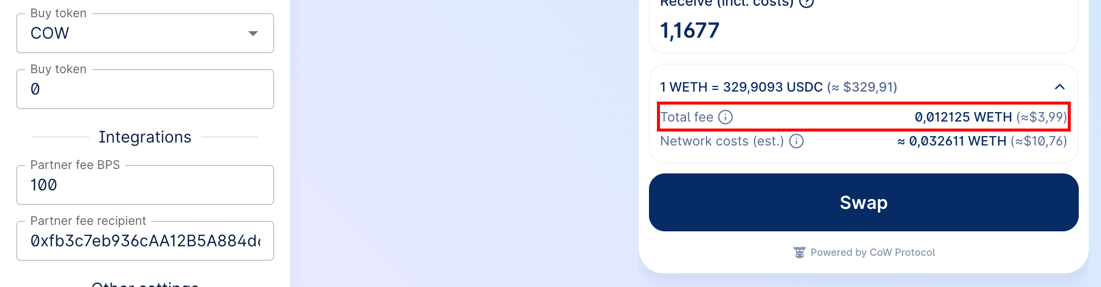
Once you have set up the partner fee, you will see the fee in the CoW Swap UI:
 [Terms and conditions](https://cow.fi/widget/terms-and-conditions) apply.
See [here](/governance/reference/partner-fee) for detailed info about fee calculation and examples.
***
## Slippage configuration
The widget supports declarative slippage settings. This allows you to fine‑tune the minimum, maximum and default slippage per network.
### Types
```
/** Slippage expressed in basis points (1 % = 100 bps) */export interface SlippageConfig { /** Lower bound. Values below this will be clamped */ min?: number /** Upper bound. Values above this will be clamped */ max?: number /** Default slippage */ defaultValue?: number}export type FlexibleSlippageConfig = FlexibleConfig
```
*All values are **basis points** (bps).*
### Parameter
Add the `slippage` field to `CowSwapWidgetParams`:
```
import { createCowSwapWidget, CowSwapWidgetParams } from '@cowprotocol/widget-lib'const params: CowSwapWidgetParams = { appCode: 'YOUR_APP_ID', slippage: { // Global rule – applies to every network min: 50, // 0.50 % max: 300, // 3.00 % defaultValue: 100, // 1.00 % },}
```
Or configure per‑network rules using the same [FlexibleConfig](https://github.com/cowprotocol/cowswap/blob/develop/libs/widget-lib/src/types.ts) pattern as `partnerFee`:
```
import { SupportedChainId } from '@cowprotocol/widget-lib'const params: CowSwapWidgetParams = { slippage: { [SupportedChainId.MAINNET]: { min: 1, max: 3900, defaultValue: 3000 }, [SupportedChainId.BASE]: { min: 500, max: 5000, defaultValue: 600 }, },}
```
### Behaviour & validation
| Rule | Description |
| ------------------ | ----------------------------------------------------------------------------------------------------------------------------------------------------------------------------------------------- |
| **Ranges** | `min ≥ 0`, `max ≤ 5000` (50 %), `min ≤ defaultValue ≤ max`, `min < max` |
| **Defaults** | If the user doesn’t specify a slippage, the widget falls back to `defaultValue` |
| **Auto slippage** | If the auto-slippage is less than or equal to `defaultValue`, the swap will use `defaultValue` |
| **ETH‑Flow floor** | When `defaultValue < 200` bps (2 %) for Ethereum Mainnet or `defaultValue < 50` (0.5 %) for other networks and the trade is *ETH‑Flow*, the widget will force the slippage to **2 %**/**0.5 %** |
### Example JSON (Configurator ready)
```
{ "slippage": { "1": { "min": 1, "max": 3900, "defaultValue": 3000 }, "8453": { "min": 500, "max": 5000, "defaultValue": 600 } }}
```
Paste the snippet into **RAW JSON params** → open the **Swap** form → check that the Settings panel reflects the configured slippage.
***
## Wallet provider
You can pass the wallet provider from your application to seamlessly use the widget as part of your application. Also, you can not specify the provider, in this case the widget will work in standalone mode with the ability to connect any wallet supported in CoW Swap.
A provider must comply with [EIP-1193](https://eips.ethereum.org/EIPS/eip-1193) and implement the interface:
```
interface EthereumProvider { on(event: string, args: unknown): void request(params: JsonRpcRequest): Promise enable(): Promise}interface JsonRpcRequest { id: number method: string params: unknown[]}
```
An example of connecting a widget to Rabby Wallet or Metamask:
```
import { createCowSwapWidget, CowSwapWidgetParams } from '@cowprotocol/widget-lib'createCowSwapWidget(document.getElementById('cowswap-widget'), { params: { appCode: 'NAME-OF-YOU-APP' }, // Add here the name of your app. e.g. "Pig Swap" provider: window.ethereum, // <-------})
```
## Configuration
### `CowSwapWidgetParams`
> All params are optional
| Parameter | Type | Default | Description |
| ------------------------------------- | ---------------------- | ----------------------- | -------------------------------------------------------------------------------------------------------------------------------------------------------------------------------------------------------------------------------------------------------------------------------------------------------------------------------------------------------------------------------------------- |
| `width` | `string` | 400px | The width of the widget in css values (px, vh, etc.). |
| `height` | `string` | 600px | The height of the widget in css values (px, vh, etc.). |
| `maxHeight` | `number` | --- | The widget automatically adjusts its height depending on the content. By default, the maximum height is `body.offsetHeight`, but it might be customized using the `maxHeight` parameter. |
| `appCode` | `string` | --- | The unique identifier of the widget consumer. Please fill the for to let us know a little about you: [https://cowprotocol.typeform.com/to/rONXaxHV](https://cowprotocol.typeform.com/to/rONXaxHV). |
| `provider` | `EthereumProvider` | --- | The Ethereum provider to be used for interacting with a wallet. To connect, for example, to Rabby Wallet or Metamask, just set `window.ethereum`. You also might like to use [https://web3modal.com](https://web3modal.com). |
| `chainId` | `number` | 1 | The blockchain ID on which the trade will take place. Supported chains: 1 (Ethereum), 100 (Gnosis Chain), 42161 (Arbitrum One), 8453 (Base), 137 (Polygon), 43114 (Avalanche), 56 (BNB), 59144 (Linea), 9745 (Plasma), 57073 (Ink), 11155111 (Sepolia). See [supported networks](/snippets/supported-networks) for the full list. |
| `tradeType` | `TradeType` | 'swap' | The type of trade. Can be `swap` or `limit` or `advanced`. |
| `env` | `CowSwapWidgetEnv` | 'prod' | The environment of the widget (`local` , `prod` , `dev` , `pr`). See [`COWSWAP_URLS`](https://github.com/cowprotocol/cowswap/blob/develop/libs/widget-lib/src/consts.ts) const value for urls. |
| `sell` | `TradeAsset` | Same as in swap.cow\.fi | An object containing information about the sell asset. Example: `{ asset: 'WBTC', amount: 12 }` or `{ asset: '0xa0b86991c6218b36c1d19d4a2e9eb0ce3606eb48' }`. |
| `buy` | `TradeAsset` | --- | An object containing information about the buy asset. Example: `{ asset: 'WBTC', amount: 12 }` or `{ asset: '0xa0b86991c6218b36c1d19d4a2e9eb0ce3606eb48' }`. |
| `theme` | `CowSwapTheme` | 'light' | The theme of the widget (`'dark'` for dark theme or `'light'` for light theme). It is also possible to set your own colors (`CowSwapWidgetPalette`). See [Custom theme](#custom-theme) section for more details. |
| `sounds` | `CowSwapWidgetSounds` | --- | The famous MOOO! sound can be changed to something else, just provide a link to a media file (mp3 or any other audio format supported by your browser). You can also specify a value of `null` to disable the sound. |
| `images` | `CowSwapWidgetImages` | --- | To make your widget unique, you can replace some of the images. For example, a stub image when there are no limit orders. |
| `banners` | `CowSwapWidgetBanners` | --- | With this option you can control the display of some banners in the CoW Swap interface. |
| `tokenLists` | `string[]` | --- | CoW Swap uses the [token lists standard](https://tokenlists.org), which allows flexible and decentralized management of assets for trading. Using this option you can set any token list you want. You also might want to use `customTokens` option for more flexible configuration. |
| `customTokens` | `TokenInfo[]` | --- | In the case when you want to use tokens that are not included in the default token lists, you can add them programmatically by simply passing an array of ERC-20 tokens info. There is also `tokenLists` option to set a ready-made list of tokens. |
| `disableToastMessages` | `boolean` | false | CoW Swap displays a pop-up notification when certain events occur, for example: an order has been filled. You may want to handle these events yourself and disable the display of notifications in the widget, to do this you need to enable this option. See [Events handling](#events-handling) section for more details. |
| `disablePostedOrderConfirmationModal` | `boolean` | false | Disables showing the confirmation modal after posting an order. |
| `disableProgressBar` | `boolean` | false | Disables showing the progress bar after a SWAP order is placed. |
| `disableCrossChainSwap` | `boolean` | false | Disables cross-chain swaps (aka Swap and Bridge) feature. |
| `standaloneMode` | `boolean` | false | When this option is enabled, the widget will use its own Ethereum provider and the user will be able to connect a wallet from within the widget. |
| `hideNetworkSelector` | `boolean` | false | Disables an opportunity to change the network from the widget UI. |
| `hideLogo` | `boolean` | false | Hides the logo in the widget. |
| `hideBridgeInfo` | `boolean` | false | Hides bridge info in the `swap` form. |
| `hideOrdersTable` | `boolean` | false | Hides orders table on `limit` and `advanced` forms. Warning! When `true`, users won't be able to see their `limit`/`twap` order status or history, neither they'll be able to cancel active orders. |
| `enabledTradeTypes` | `Array` | All are enabled | CoW Swap provides three trading widgets: `swap`, `limit` and `advanced` orders. Using this option you can narrow down the list of available trading widgets. |
| `partnerFee` | `PartnerFee` | --- | You can enable a fee for all trades in the widget. See [Partner fee](#partner-fee) section for more details. |
| `forcedOrderDeadline` | `ForcedOrderDeadline` | --- | Order deadline in minutes. Either a single value applied to each individual order type accordingly or an optional individual value per order type. The app will use the appropriated min/max value per order type. When set, user's won't be able to edit the deadline. Accepted values: single for all `123` OR per TradeType `{"swap": 15, "limit": 666}` OR per network `{1: 35, 100: 5}` |
| `slippage` | `SlippageConfig` | --- | You can set up a slippage settings for all networks in the widget. See [Slippage configuration](#slippage-configuration) section for more details. |
## Custom theme
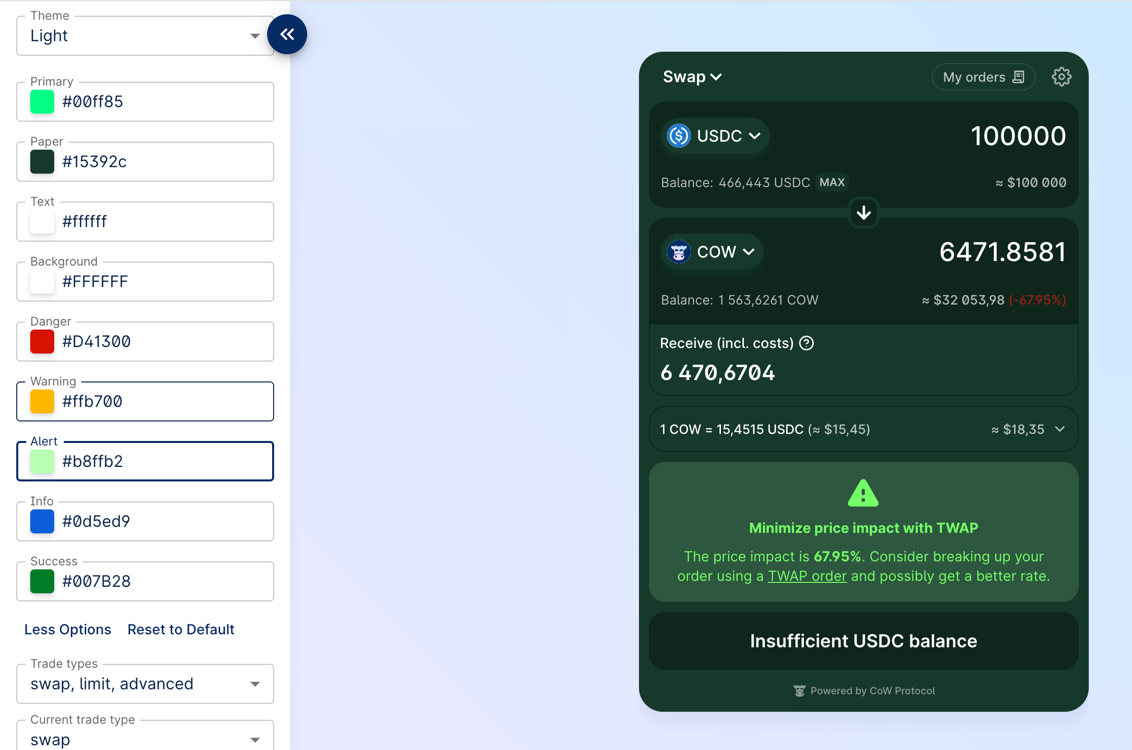
By setting custom colors you can very flexibly control the appearance of the widget. To do this, you need to pass an object of type `CowSwapWidgetPalette` to the `theme` parameter.
You actually can specify only 2 or 3 basic colors, the rest of the palette is efficiently derived (also with the help of the [color2k](https://github.com/ricokahler/color2k) library to get 'AA' rated text/background color contrasts).
Example:
```
import { createCowSwapWidget, CowSwapWidgetParams, CowSwapWidgetPalette } from '@cowprotocol/widget-lib'const widgetContainer = document.getElementById('cowswap-widget')// Set custom colorsconst theme: CowSwapWidgetPalette = { baseTheme: 'light', primary: '#00ff85', background: '#f7f7f7', paper: '#1a4435', text: '#ffffff', warning: '#ffb700', alert: '#b8ffb2', success: '#19ff64',}const params: CowSwapWidgetParams = { appCode: 'NAME-OF-YOU-APP', // Add here the name of your app. e.g. "Pig Swap" theme,}createCowSwapWidget(widgetContainer, { params })
```
Try it yourself: [https://widget.cow.fi](https://widget.cow.fi).
[Terms and conditions](https://cow.fi/widget/terms-and-conditions) apply.
See [here](/governance/reference/partner-fee) for detailed info about fee calculation and examples.
***
## Slippage configuration
The widget supports declarative slippage settings. This allows you to fine‑tune the minimum, maximum and default slippage per network.
### Types
```
/** Slippage expressed in basis points (1 % = 100 bps) */export interface SlippageConfig { /** Lower bound. Values below this will be clamped */ min?: number /** Upper bound. Values above this will be clamped */ max?: number /** Default slippage */ defaultValue?: number}export type FlexibleSlippageConfig = FlexibleConfig
```
*All values are **basis points** (bps).*
### Parameter
Add the `slippage` field to `CowSwapWidgetParams`:
```
import { createCowSwapWidget, CowSwapWidgetParams } from '@cowprotocol/widget-lib'const params: CowSwapWidgetParams = { appCode: 'YOUR_APP_ID', slippage: { // Global rule – applies to every network min: 50, // 0.50 % max: 300, // 3.00 % defaultValue: 100, // 1.00 % },}
```
Or configure per‑network rules using the same [FlexibleConfig](https://github.com/cowprotocol/cowswap/blob/develop/libs/widget-lib/src/types.ts) pattern as `partnerFee`:
```
import { SupportedChainId } from '@cowprotocol/widget-lib'const params: CowSwapWidgetParams = { slippage: { [SupportedChainId.MAINNET]: { min: 1, max: 3900, defaultValue: 3000 }, [SupportedChainId.BASE]: { min: 500, max: 5000, defaultValue: 600 }, },}
```
### Behaviour & validation
| Rule | Description |
| ------------------ | ----------------------------------------------------------------------------------------------------------------------------------------------------------------------------------------------- |
| **Ranges** | `min ≥ 0`, `max ≤ 5000` (50 %), `min ≤ defaultValue ≤ max`, `min < max` |
| **Defaults** | If the user doesn’t specify a slippage, the widget falls back to `defaultValue` |
| **Auto slippage** | If the auto-slippage is less than or equal to `defaultValue`, the swap will use `defaultValue` |
| **ETH‑Flow floor** | When `defaultValue < 200` bps (2 %) for Ethereum Mainnet or `defaultValue < 50` (0.5 %) for other networks and the trade is *ETH‑Flow*, the widget will force the slippage to **2 %**/**0.5 %** |
### Example JSON (Configurator ready)
```
{ "slippage": { "1": { "min": 1, "max": 3900, "defaultValue": 3000 }, "8453": { "min": 500, "max": 5000, "defaultValue": 600 } }}
```
Paste the snippet into **RAW JSON params** → open the **Swap** form → check that the Settings panel reflects the configured slippage.
***
## Wallet provider
You can pass the wallet provider from your application to seamlessly use the widget as part of your application. Also, you can not specify the provider, in this case the widget will work in standalone mode with the ability to connect any wallet supported in CoW Swap.
A provider must comply with [EIP-1193](https://eips.ethereum.org/EIPS/eip-1193) and implement the interface:
```
interface EthereumProvider { on(event: string, args: unknown): void request(params: JsonRpcRequest): Promise enable(): Promise}interface JsonRpcRequest { id: number method: string params: unknown[]}
```
An example of connecting a widget to Rabby Wallet or Metamask:
```
import { createCowSwapWidget, CowSwapWidgetParams } from '@cowprotocol/widget-lib'createCowSwapWidget(document.getElementById('cowswap-widget'), { params: { appCode: 'NAME-OF-YOU-APP' }, // Add here the name of your app. e.g. "Pig Swap" provider: window.ethereum, // <-------})
```
## Configuration
### `CowSwapWidgetParams`
> All params are optional
| Parameter | Type | Default | Description |
| ------------------------------------- | ---------------------- | ----------------------- | -------------------------------------------------------------------------------------------------------------------------------------------------------------------------------------------------------------------------------------------------------------------------------------------------------------------------------------------------------------------------------------------- |
| `width` | `string` | 400px | The width of the widget in css values (px, vh, etc.). |
| `height` | `string` | 600px | The height of the widget in css values (px, vh, etc.). |
| `maxHeight` | `number` | --- | The widget automatically adjusts its height depending on the content. By default, the maximum height is `body.offsetHeight`, but it might be customized using the `maxHeight` parameter. |
| `appCode` | `string` | --- | The unique identifier of the widget consumer. Please fill the for to let us know a little about you: [https://cowprotocol.typeform.com/to/rONXaxHV](https://cowprotocol.typeform.com/to/rONXaxHV). |
| `provider` | `EthereumProvider` | --- | The Ethereum provider to be used for interacting with a wallet. To connect, for example, to Rabby Wallet or Metamask, just set `window.ethereum`. You also might like to use [https://web3modal.com](https://web3modal.com). |
| `chainId` | `number` | 1 | The blockchain ID on which the trade will take place. Supported chains: 1 (Ethereum), 100 (Gnosis Chain), 42161 (Arbitrum One), 8453 (Base), 137 (Polygon), 43114 (Avalanche), 56 (BNB), 59144 (Linea), 9745 (Plasma), 57073 (Ink), 11155111 (Sepolia). See [supported networks](/snippets/supported-networks) for the full list. |
| `tradeType` | `TradeType` | 'swap' | The type of trade. Can be `swap` or `limit` or `advanced`. |
| `env` | `CowSwapWidgetEnv` | 'prod' | The environment of the widget (`local` , `prod` , `dev` , `pr`). See [`COWSWAP_URLS`](https://github.com/cowprotocol/cowswap/blob/develop/libs/widget-lib/src/consts.ts) const value for urls. |
| `sell` | `TradeAsset` | Same as in swap.cow\.fi | An object containing information about the sell asset. Example: `{ asset: 'WBTC', amount: 12 }` or `{ asset: '0xa0b86991c6218b36c1d19d4a2e9eb0ce3606eb48' }`. |
| `buy` | `TradeAsset` | --- | An object containing information about the buy asset. Example: `{ asset: 'WBTC', amount: 12 }` or `{ asset: '0xa0b86991c6218b36c1d19d4a2e9eb0ce3606eb48' }`. |
| `theme` | `CowSwapTheme` | 'light' | The theme of the widget (`'dark'` for dark theme or `'light'` for light theme). It is also possible to set your own colors (`CowSwapWidgetPalette`). See [Custom theme](#custom-theme) section for more details. |
| `sounds` | `CowSwapWidgetSounds` | --- | The famous MOOO! sound can be changed to something else, just provide a link to a media file (mp3 or any other audio format supported by your browser). You can also specify a value of `null` to disable the sound. |
| `images` | `CowSwapWidgetImages` | --- | To make your widget unique, you can replace some of the images. For example, a stub image when there are no limit orders. |
| `banners` | `CowSwapWidgetBanners` | --- | With this option you can control the display of some banners in the CoW Swap interface. |
| `tokenLists` | `string[]` | --- | CoW Swap uses the [token lists standard](https://tokenlists.org), which allows flexible and decentralized management of assets for trading. Using this option you can set any token list you want. You also might want to use `customTokens` option for more flexible configuration. |
| `customTokens` | `TokenInfo[]` | --- | In the case when you want to use tokens that are not included in the default token lists, you can add them programmatically by simply passing an array of ERC-20 tokens info. There is also `tokenLists` option to set a ready-made list of tokens. |
| `disableToastMessages` | `boolean` | false | CoW Swap displays a pop-up notification when certain events occur, for example: an order has been filled. You may want to handle these events yourself and disable the display of notifications in the widget, to do this you need to enable this option. See [Events handling](#events-handling) section for more details. |
| `disablePostedOrderConfirmationModal` | `boolean` | false | Disables showing the confirmation modal after posting an order. |
| `disableProgressBar` | `boolean` | false | Disables showing the progress bar after a SWAP order is placed. |
| `disableCrossChainSwap` | `boolean` | false | Disables cross-chain swaps (aka Swap and Bridge) feature. |
| `standaloneMode` | `boolean` | false | When this option is enabled, the widget will use its own Ethereum provider and the user will be able to connect a wallet from within the widget. |
| `hideNetworkSelector` | `boolean` | false | Disables an opportunity to change the network from the widget UI. |
| `hideLogo` | `boolean` | false | Hides the logo in the widget. |
| `hideBridgeInfo` | `boolean` | false | Hides bridge info in the `swap` form. |
| `hideOrdersTable` | `boolean` | false | Hides orders table on `limit` and `advanced` forms. Warning! When `true`, users won't be able to see their `limit`/`twap` order status or history, neither they'll be able to cancel active orders. |
| `enabledTradeTypes` | `Array` | All are enabled | CoW Swap provides three trading widgets: `swap`, `limit` and `advanced` orders. Using this option you can narrow down the list of available trading widgets. |
| `partnerFee` | `PartnerFee` | --- | You can enable a fee for all trades in the widget. See [Partner fee](#partner-fee) section for more details. |
| `forcedOrderDeadline` | `ForcedOrderDeadline` | --- | Order deadline in minutes. Either a single value applied to each individual order type accordingly or an optional individual value per order type. The app will use the appropriated min/max value per order type. When set, user's won't be able to edit the deadline. Accepted values: single for all `123` OR per TradeType `{"swap": 15, "limit": 666}` OR per network `{1: 35, 100: 5}` |
| `slippage` | `SlippageConfig` | --- | You can set up a slippage settings for all networks in the widget. See [Slippage configuration](#slippage-configuration) section for more details. |
## Custom theme
By setting custom colors you can very flexibly control the appearance of the widget. To do this, you need to pass an object of type `CowSwapWidgetPalette` to the `theme` parameter.
You actually can specify only 2 or 3 basic colors, the rest of the palette is efficiently derived (also with the help of the [color2k](https://github.com/ricokahler/color2k) library to get 'AA' rated text/background color contrasts).
Example:
```
import { createCowSwapWidget, CowSwapWidgetParams, CowSwapWidgetPalette } from '@cowprotocol/widget-lib'const widgetContainer = document.getElementById('cowswap-widget')// Set custom colorsconst theme: CowSwapWidgetPalette = { baseTheme: 'light', primary: '#00ff85', background: '#f7f7f7', paper: '#1a4435', text: '#ffffff', warning: '#ffb700', alert: '#b8ffb2', success: '#19ff64',}const params: CowSwapWidgetParams = { appCode: 'NAME-OF-YOU-APP', // Add here the name of your app. e.g. "Pig Swap" theme,}createCowSwapWidget(widgetContainer, { params })
```
Try it yourself: [https://widget.cow.fi](https://widget.cow.fi).
 ## Custom tokens
CowSwap uses the [token lists standard](https://tokenlists.org), which allows flexible and decentralized management of assets for trading. You can manage the list of tokens in CoW Swap UI:
## Custom tokens
CowSwap uses the [token lists standard](https://tokenlists.org), which allows flexible and decentralized management of assets for trading. You can manage the list of tokens in CoW Swap UI:
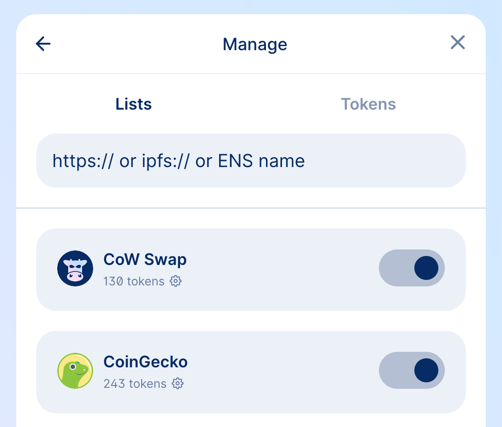 In the widget you have two options to add custom tokens:
* using `tokenLists` parameter
* using `customTokens` parameter
### `tokenLists`
In this parameter you can specify the URL or ENS address of the token list.
> How to create and deploy your own token list you can find in the [guide](https://hackmd.io/@mastercow/creating-custom-token-lists).
```
import { createCowSwapWidget, CowSwapWidgetParams } from '@cowprotocol/widget-lib'const container = document.getElementById('cowswap-widget')const params: CowSwapWidgetParams = { tokenLists: ['https://files.cow.fi/tokens/CowSwap.json'] }createCowSwapWidget(container, { params })
```
### `customTokens`
If you want to use tokens that are not included in the default token lists, you can add them programmatically by passing an array of ERC-20 tokens info.
```
import { createCowSwapWidget, CowSwapWidgetParams, TokenInfo } from '@cowprotocol/widget-lib'const container = document.getElementById('cowswap-widget')const customTokens: TokenInfo = [ { chainId: 1, address: '0x69D29F1b0cC37d8d3B61583c99Ad0ab926142069', name: 'ƎԀƎԀ', decimals: 9, symbol: 'ƎԀƎԀ', logoURI: 'https://assets.coingecko.com/coins/images/31948/large/photo_2023-09-25_14-05-49.jpg?1696530754', }, { chainId: 1, address: '0x9F9643209dCCe8D7399D7BF932354768069Ebc64', name: 'Invest Club Global', decimals: 18, symbol: 'ICG', logoURI: 'https://assets.coingecko.com/coins/images/34316/large/thatone_200%281%29.png?1704621005', },]const params: CowSwapWidgetParams = { customTokens }createCowSwapWidget(container, { params })
```
## Events handling
The widget provides a bus of events that occur in the widget. Using it, you can receive notifications, for example, when an order has been executed or when an approval transaction has been mined.
Separately, it is worth noting the `ON_TOAST_MESSAGE` event; it occurs every time any notification is displayed in CoW Swap. To avoid double display of notifications, enable the `disableToastMessages` option in the widget configurations.
> A list of all possible events can be found in the source code on [Github](https://github.com/cowprotocol/cowswap/blob/develop/libs/events/src/types/events.ts).
### Events usage example
```
import { createCowSwapWidget, CowSwapWidgetParams, CowEventListeners, CowEvents } from '@cowprotocol/widget-lib'const params: CowSwapWidgetParams = { appCode: 'YOUR_APP_ID' }const listeners: CowEventListeners = [ { event: CowEvents.ON_TOAST_MESSAGE, handler: (event) => console.log('[ON_TOAST_MESSAGE]', event.message) }, { event: CowEvents.ON_EXPIRED_ORDER, handler: (event) => console.log('Order was expired:', event.order) },]const { updateListeners } = createCowSwapWidget(container, { params, listeners })// If you want to change listeners at some point, you can do it like:updateListeners([ { event: CowEvents.ON_CANCELLED_ORDER, handler: (event) => console.log('Order was cancelled:', event.order) },])
```
## Widget updating
You can change all possible widget options on the fly:
```
import { createCowSwapWidget, CowSwapWidgetParams } from '@cowprotocol/widget-lib'const container = document.getElementById('cowswap-widget')const params: CowSwapWidgetParams = { appCode: 'NAME-OF-YOU-APP', // Add here the name of your app. e.g. "Pig Swap" logoUrl: 'YOUR_LOGO_URL',}const updateWidget = createCowSwapWidget(container, { params })// Update the widgetupdateWidget({ ...params, theme: 'dark', // <- Change theme to dark hideNetworkSelector: true, // <- Hide the network selector})
```
## Widget URL
Most of the widget parameters are controlled via the URL, which means that you can create the URL yourself and embed the iframe. An example of URL:
```
https://swap.cow.fi/#/100/swap/WXDAI/GNO?sellAmount=200&theme=dark
```
## Customization
### Sounds
```
import { createCowSwapWidget, CowSwapWidgetParams } from '@cowprotocol/widget-lib'const container = document.getElementById('cowswap-widget')const params: CowSwapWidgetParams = { sounds: { // The sound that will be played when the order is placed postOrder: 'https://swap.cow.fi/audio/send-winterTheme.mp3', // Nothing will be played when the order is executed orderExecuted: null, // Since `orderError` is not specified, the default sound will be played },}createCowSwapWidget(container, { params })
```
### Images
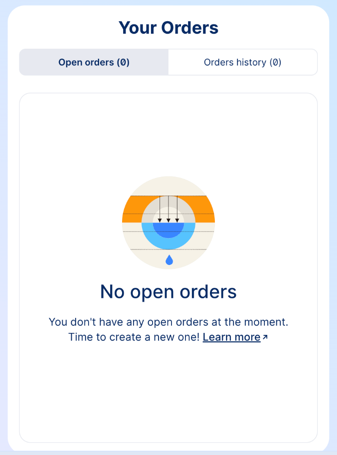
In the example below, we replace the image that is displayed when there are no orders in the limit orders table. You can replace any image in the widget in the same way.
```
import { createCowSwapWidget, CowSwapWidgetParams } from '@cowprotocol/widget-lib'const container = document.getElementById('cowswap-widget')const params: CowSwapWidgetParams = { images: { emptyOrders: 'https://cow.fi/images/cowamm-illustration-lvr.svg' } }createCowSwapWidget(container, { params })
```
In the widget you have two options to add custom tokens:
* using `tokenLists` parameter
* using `customTokens` parameter
### `tokenLists`
In this parameter you can specify the URL or ENS address of the token list.
> How to create and deploy your own token list you can find in the [guide](https://hackmd.io/@mastercow/creating-custom-token-lists).
```
import { createCowSwapWidget, CowSwapWidgetParams } from '@cowprotocol/widget-lib'const container = document.getElementById('cowswap-widget')const params: CowSwapWidgetParams = { tokenLists: ['https://files.cow.fi/tokens/CowSwap.json'] }createCowSwapWidget(container, { params })
```
### `customTokens`
If you want to use tokens that are not included in the default token lists, you can add them programmatically by passing an array of ERC-20 tokens info.
```
import { createCowSwapWidget, CowSwapWidgetParams, TokenInfo } from '@cowprotocol/widget-lib'const container = document.getElementById('cowswap-widget')const customTokens: TokenInfo = [ { chainId: 1, address: '0x69D29F1b0cC37d8d3B61583c99Ad0ab926142069', name: 'ƎԀƎԀ', decimals: 9, symbol: 'ƎԀƎԀ', logoURI: 'https://assets.coingecko.com/coins/images/31948/large/photo_2023-09-25_14-05-49.jpg?1696530754', }, { chainId: 1, address: '0x9F9643209dCCe8D7399D7BF932354768069Ebc64', name: 'Invest Club Global', decimals: 18, symbol: 'ICG', logoURI: 'https://assets.coingecko.com/coins/images/34316/large/thatone_200%281%29.png?1704621005', },]const params: CowSwapWidgetParams = { customTokens }createCowSwapWidget(container, { params })
```
## Events handling
The widget provides a bus of events that occur in the widget. Using it, you can receive notifications, for example, when an order has been executed or when an approval transaction has been mined.
Separately, it is worth noting the `ON_TOAST_MESSAGE` event; it occurs every time any notification is displayed in CoW Swap. To avoid double display of notifications, enable the `disableToastMessages` option in the widget configurations.
> A list of all possible events can be found in the source code on [Github](https://github.com/cowprotocol/cowswap/blob/develop/libs/events/src/types/events.ts).
### Events usage example
```
import { createCowSwapWidget, CowSwapWidgetParams, CowEventListeners, CowEvents } from '@cowprotocol/widget-lib'const params: CowSwapWidgetParams = { appCode: 'YOUR_APP_ID' }const listeners: CowEventListeners = [ { event: CowEvents.ON_TOAST_MESSAGE, handler: (event) => console.log('[ON_TOAST_MESSAGE]', event.message) }, { event: CowEvents.ON_EXPIRED_ORDER, handler: (event) => console.log('Order was expired:', event.order) },]const { updateListeners } = createCowSwapWidget(container, { params, listeners })// If you want to change listeners at some point, you can do it like:updateListeners([ { event: CowEvents.ON_CANCELLED_ORDER, handler: (event) => console.log('Order was cancelled:', event.order) },])
```
## Widget updating
You can change all possible widget options on the fly:
```
import { createCowSwapWidget, CowSwapWidgetParams } from '@cowprotocol/widget-lib'const container = document.getElementById('cowswap-widget')const params: CowSwapWidgetParams = { appCode: 'NAME-OF-YOU-APP', // Add here the name of your app. e.g. "Pig Swap" logoUrl: 'YOUR_LOGO_URL',}const updateWidget = createCowSwapWidget(container, { params })// Update the widgetupdateWidget({ ...params, theme: 'dark', // <- Change theme to dark hideNetworkSelector: true, // <- Hide the network selector})
```
## Widget URL
Most of the widget parameters are controlled via the URL, which means that you can create the URL yourself and embed the iframe. An example of URL:
```
https://swap.cow.fi/#/100/swap/WXDAI/GNO?sellAmount=200&theme=dark
```
## Customization
### Sounds
```
import { createCowSwapWidget, CowSwapWidgetParams } from '@cowprotocol/widget-lib'const container = document.getElementById('cowswap-widget')const params: CowSwapWidgetParams = { sounds: { // The sound that will be played when the order is placed postOrder: 'https://swap.cow.fi/audio/send-winterTheme.mp3', // Nothing will be played when the order is executed orderExecuted: null, // Since `orderError` is not specified, the default sound will be played },}createCowSwapWidget(container, { params })
```
### Images
In the example below, we replace the image that is displayed when there are no orders in the limit orders table. You can replace any image in the widget in the same way.
```
import { createCowSwapWidget, CowSwapWidgetParams } from '@cowprotocol/widget-lib'const container = document.getElementById('cowswap-widget')const params: CowSwapWidgetParams = { images: { emptyOrders: 'https://cow.fi/images/cowamm-illustration-lvr.svg' } }createCowSwapWidget(container, { params })
```
 ### Banners
In some cases, you may want to hide some banners in the CoW Swap interface. To do this, you need to specify the `banners` parameter in the widget configuration.
```
import { createCowSwapWidget, CowSwapWidgetParams } from '@cowprotocol/widget-lib'const container = document.getElementById('cowswap-widget')const params: CowSwapWidgetParams = { banners: { hideSafeWebAppBanner: true } }createCowSwapWidget(container, { params })
```
This banner will be hidden:
### Banners
In some cases, you may want to hide some banners in the CoW Swap interface. To do this, you need to specify the `banners` parameter in the widget configuration.
```
import { createCowSwapWidget, CowSwapWidgetParams } from '@cowprotocol/widget-lib'const container = document.getElementById('cowswap-widget')const params: CowSwapWidgetParams = { banners: { hideSafeWebAppBanner: true } }createCowSwapWidget(container, { params })
```
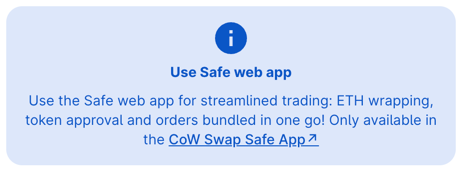
This banner will be hidden: